
Best Platforms for Hosting Restaurant Menu Online

Lina
Chief Editor
If you're looking to bring your restaurant's menu online, these platforms provide easy and reliable solutions for hosting and sharing your menu digitally. Whether you're a small cafe or a large restaurant, these platforms can help enhance your customer's dining experience.
Most menu tools stop at the Download button. You end up with a good-looking PDF from Canva or from your printer and no address to put on a QR code. This guide covers the part after the download: the four ways to get a menu online, the steps for the quickest one, where to host the file, and how to change prices without reprinting a single table card.
Four Ways to Put Your Menu Online
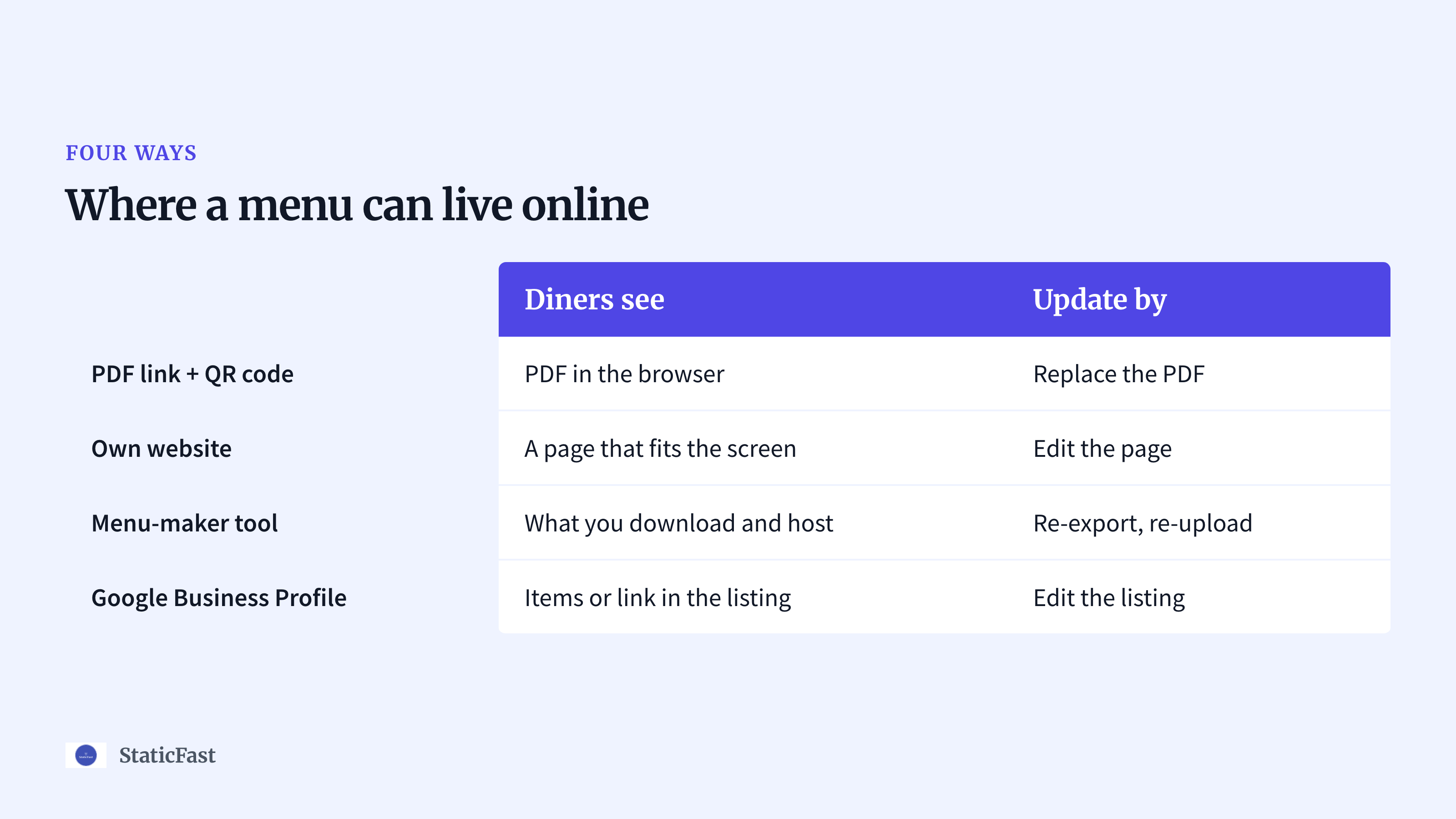
There are only four places a menu can live online. Each one suits a different kind of restaurant, and most places end up using two of them.
| Way | Best for | What diners see | How you update it |
|---|---|---|---|
| PDF link + QR code | Any restaurant with a printed menu already | The PDF in their phone browser | Replace the PDF, keep the link |
| Menu page on your own website | Restaurants that already run a site | A web page that fits the screen | Edit the page |
| Menu-maker tool | Menus that need designing first | Whatever you download and host | Re-export, then re-upload |
| Google Business Profile | Walk-in and search traffic | Items or a menu link in the Google listing | Edit the listing |
A PDF link with a QR code is the fastest path. You already have the menu as a PDF, because that is what the printer asked for. Upload it to a PDF host, get a link, put a QR code on the table. It suits cafés, food trucks, bars and any restaurant that wants the menu online before the weekend without a web developer.
A menu page on your own website is the better long-term answer if you already have a site. A page built for phones reads better than a PDF designed for A4 paper. If you do not have a site, a one-page static menu is enough. The Eaty and Menuz templates are free HTML menu pages you can fill in and host anywhere that serves static files.
A menu-maker tool is where most people start, and where the search for "how do I host this" begins. Design tools give you templates, fonts and a download; they do not give you a public address. If you still need to design the menu, a free restaurant menu maker that exports a print-ready PDF saves you the Canva step. You then host that PDF the same way as the first option.
Google Business Profile is free and is where people who search for your restaurant by name see hours, photos and, in many regions, a menu. Add your menu link there even if you use one of the other three, because the diner who finds you on a map rarely visits your website first. It is not a replacement for a menu on the table, since nobody at table nine is going to search for you.
Put a PDF Menu Online with a QR Code, Step by Step
This is the path most restaurants take first. It takes under an hour, and the hosting part takes five minutes.
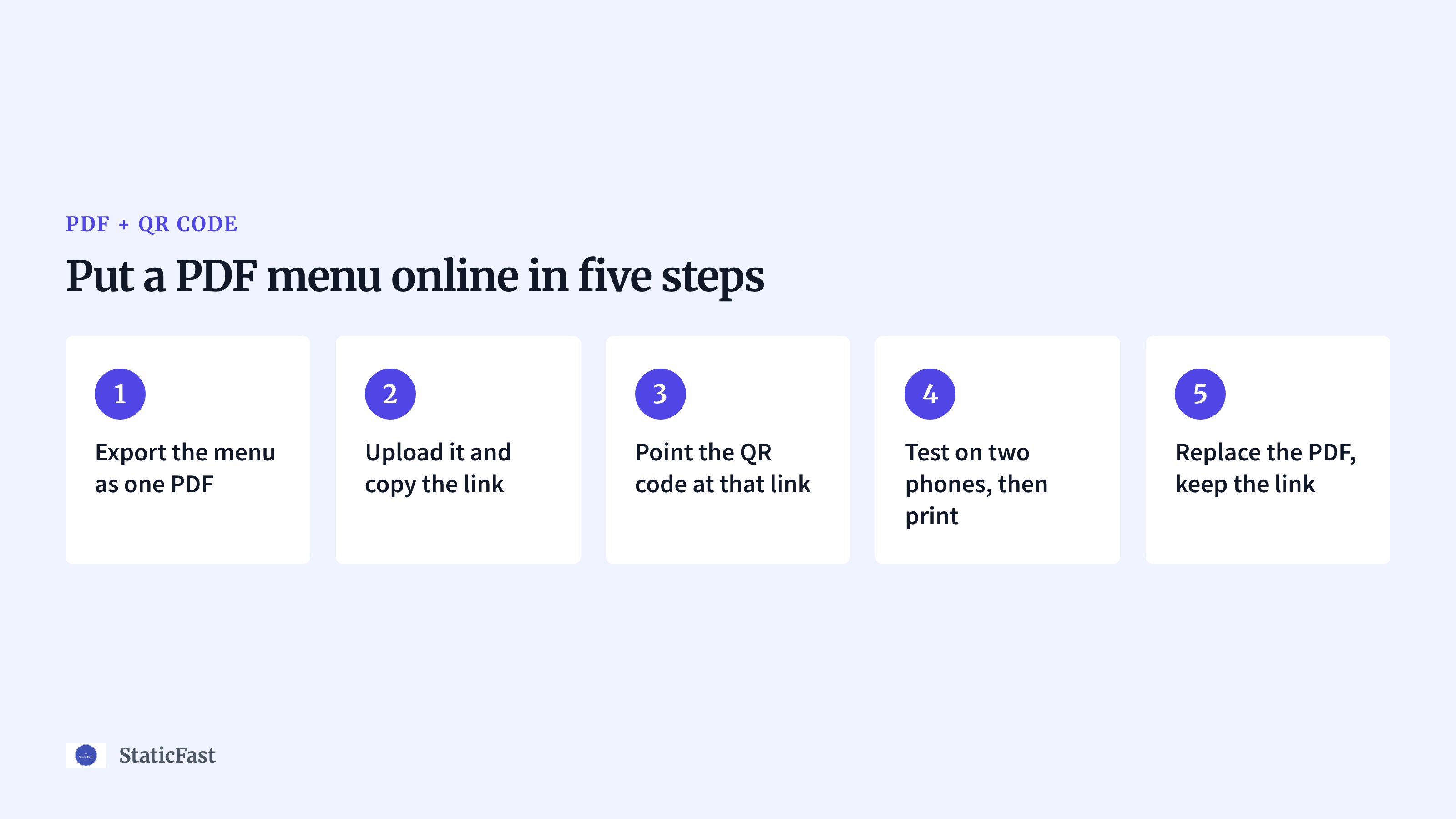
- Export the menu as one PDF: One file, all pages, from Canva, Word, the menu maker or the file your printer used. Export without full-resolution photos. A menu that is a few megabytes loads slowly on mobile data, and a diner at the table is on mobile data more often than on your Wi-Fi.
- Upload it to a PDF host and copy the link: The three hosts below all do this. The link is what everything else points at, so copy it somewhere safe. Open it on your own phone with Wi-Fi off before you go further.
- Make the QR code point at that link: Most hosts generate a QR code for the file. If yours does not, any QR generator works, as long as the code opens the menu PDF itself and not your homepage. A diner who scans a QR code wants the menu, not a navigation bar.
- Test on two phones, then print: Scan it with an iPhone camera and an Android camera from a seated position. If both open the PDF without a download prompt, print the code on table cards, the door and the counter. Order more cards than you have tables; they get wet.
- Replace the PDF behind the same link when prices change: This is the step that decides whether the whole setup works for a year or for a month. Pick a host that lets you re-upload a new file without changing the link, and the cards you printed in step 4 never go out of date.
Step 2 is where the platforms differ, so here is how the three hosts we see restaurants use most compare.
Tiiny.host
Website: https://tiiny.host/

Tiiny.host offers a simple, free platform for hosting small files, including restaurant menus. With a no-fuss interface and easy sharing options, it's perfect for restaurants looking for a quick, hassle-free solution.
Before you print a QR code to a free plan on any host, read what happens when the free period or the file limit runs out. A link that stops working takes the whole menu down with it, and the cards are already on the tables.
StaticFast
Website: https://staticfast.com/online-menu-hosting

StaticFast specializes in providing fast and reliable hosting for static content, including digital menus. It ensures your menu loads quickly, providing a seamless user experience for customers on any device.
We built the menu hosting page for exactly the five steps above. Drag and drop the PDF and you get a public URL and a QR code for it. Diners open the menu in the browser; there is no app and no download prompt. When the kitchen changes a price, you re-upload the PDF and the link and QR code stay the same, so the printed cards keep working. Solo is $9 a month for 2 PDFs and up to 20 MB of storage; Growth is $19 a month for 5 PDFs and up to 100 MB. Both plans include the QR code, view and download tracking, password protection and SSL. StaticFast hosts the file; it does not design it, so bring a finished PDF.
Issuu
Website: https://issuu.com/

Issuu is a platform designed for publishing and sharing digital documents, including restaurant menus. With a visually appealing interface and the ability to embed your menu on websites or share it directly with customers, Issuu makes menu sharing professional and easy.
Issuu shows documents in a page-flipping reader rather than as a plain PDF. That looks good for a seasonal brochure; for a two-page menu, test it on a phone and decide whether your diners want to flip pages or scroll.
Keeping Prices Current Without Reprinting
A printed QR code is a promise that the address on it will work next year. Keep that promise by making sure the address never changes, whichever of the four ways you chose.
- PDF link: Replace the file behind the existing link. Do not upload a new file and get a new link, because then the cards are wrong. Keep a dated copy of each version on your own computer; the host keeps the live one.
- Menu page on your website: Edit the page. The URL stays, there is nothing to re-upload, and the change is live when you save.
- Menu-maker tool: Re-export the PDF and re-upload it to your host under the same link. Never print the QR code the design tool offers you for its own share link; that link belongs to the tool, and re-exporting the design can change it.
- Google Business Profile: Edit the items or the menu link in the listing. If the link points at your hosted PDF, it updates itself when you replace the file.
Put a small "prices valid from" date in the footer of the menu. It costs nothing, and it tells a diner looking at a cached copy whether to trust what they see.
What Diners See on a Phone
Whatever you host, the menu will be read on a phone held in one hand at a table. Three things decide whether that goes well.
Load time. The file size you exported in step 1 is the whole story. A menu full of dish photos can run to tens of megabytes; a text menu with a logo is a few hundred kilobytes. Export the photo-heavy version for print and a lighter one for the QR code, or drop the photos from the online version.
Pinch-zoom versus a page that fits. A PDF laid out for A4 or Letter paper shows up on a phone as a whole page with small text, and the diner has to pinch and pan to read it. If you stay with a PDF, export a second version with a narrow page size and one column; the menu maker and most design tools let you set the page size. A menu page on your own website avoids the problem, since a web page wraps to the screen.
No app, no login, no download. The diner should tap the link and see the menu. A host that opens the PDF in the browser does that. A host that forces a download leaves the diner looking for the file in their downloads folder, and a page that asks them to sign in or install an app loses them before the drinks arrive.
What Each Option Costs
A menu page on a site you already pay for costs nothing extra. Google Business Profile is free. Menu-maker tools and PDF hosts each have a free tier and paid plans, and the limits on those free tiers are what matter for a menu: how many files, how much storage, how long the file stays up, and whether you can replace it under the same link.
We do not list the other hosts' prices here, because they change and a stale number is worse than none. Before you print, open the vendor's own pricing page, note the plan and the date, and check that the plan you are on covers a file that stays online for a year. StaticFast's current plans are in its entry above.
Common Mistakes
- The menu is only on Instagram. Instagram asks for a login on the web, the photos cannot be zoomed to read prices, and search engines cannot read a price in a picture. Post the menu there as well, not instead.
- The PDF is too large. A 20 MB export of a print menu takes a long time on mobile data. Export a lighter version for the QR code.
- The QR code opens the homepage. The diner then has to find the menu in your navigation. Point the code at the menu itself.
- The QR code was printed from a design tool's share link. That link belongs to the tool and can change when you re-export. Print the link of the host you control.
- The menu has no date. When a price is wrong, a date tells the diner and the staff which version they are looking at.
- It was never tested on a phone. A layout that looks fine on a laptop is unreadable on a five-inch screen. Scan the code at a table before you order the cards.
Conclusion
Pick one of the four ways, make sure the address you print will not change, and keep the file small enough for a phone on mobile data. If your menu is a PDF already, the step-by-step above gets it online today. For other documents you want on a public link, see our roundup of platforms to host your resume online; the same hosts work for a menu.